Your localhost and 127.0.0.1 aren't the same
We generally believe localhost and 127.0.0.1 are the same, but they are not!
 Team TechCoder6 min read
Before you start
- Basic know how of containerization
Why localhost and 127.0.0.1 Aren’t the Same Thing
You have an application running inside a Docker container.
You open your browser on your laptop and type:
http://localhost:3000The application opens.
Now stop for a second.
Where did localhost point to?
Your laptop?
Or the container?
The application is running inside the container, after all. So if localhost means “this machine”, shouldn't it refer to the container?
And then there is another address you've probably used hundreds of times:
http://127.0.0.1:3000That works too.
At this point, it's easy to think:
localhostand127.0.0.1are just two ways of writing the same thing.
That assumption works often enough that most developers never question it.
Until you hit a problem where:
localhost:3000  → works
127.0.0.1:3000  → doesn't
Or the other way around.
So what's actually happening?
The answer starts with something simple:
localhost is a name. 127.0.0.1 is an address.
But before getting there, we need to answer the container question.
So, whose localhost is it?
If an application is running inside a container and it makes a request to:
localhost:3000localhost refers to the container itself.
Not your laptop.
Not the Docker host.
The container has its own network environment, including its own loopback interface.
So if your application inside the container does this:
GET http://localhost:3000the request stays inside that container.
Think of it like this:
Docker container

┌─────────────────────────────┐
│                             │
│  Application                │
│       │                     │
│       ▼                     │
│  localhost:3000             │
│       │                     │
│       ▼                     │
│  same container             │
│                             │
└─────────────────────────────┘
This is why localhost can be confusing when Docker enters the picture.
When you type localhost in your browser, your browser is the one making the connection.
So its localhost refers to the machine where the browser is running.
When an application inside a container uses localhost, the application is making the connection.
So its localhost refers to the container.
Same word.
Different network environment.
That distinction alone explains a lot of Docker networking confusion.
But it still doesn't explain why localhost and 127.0.0.1 aren't technically the same thing.
For that, we need to look at what 127.0.0.1 actually is.
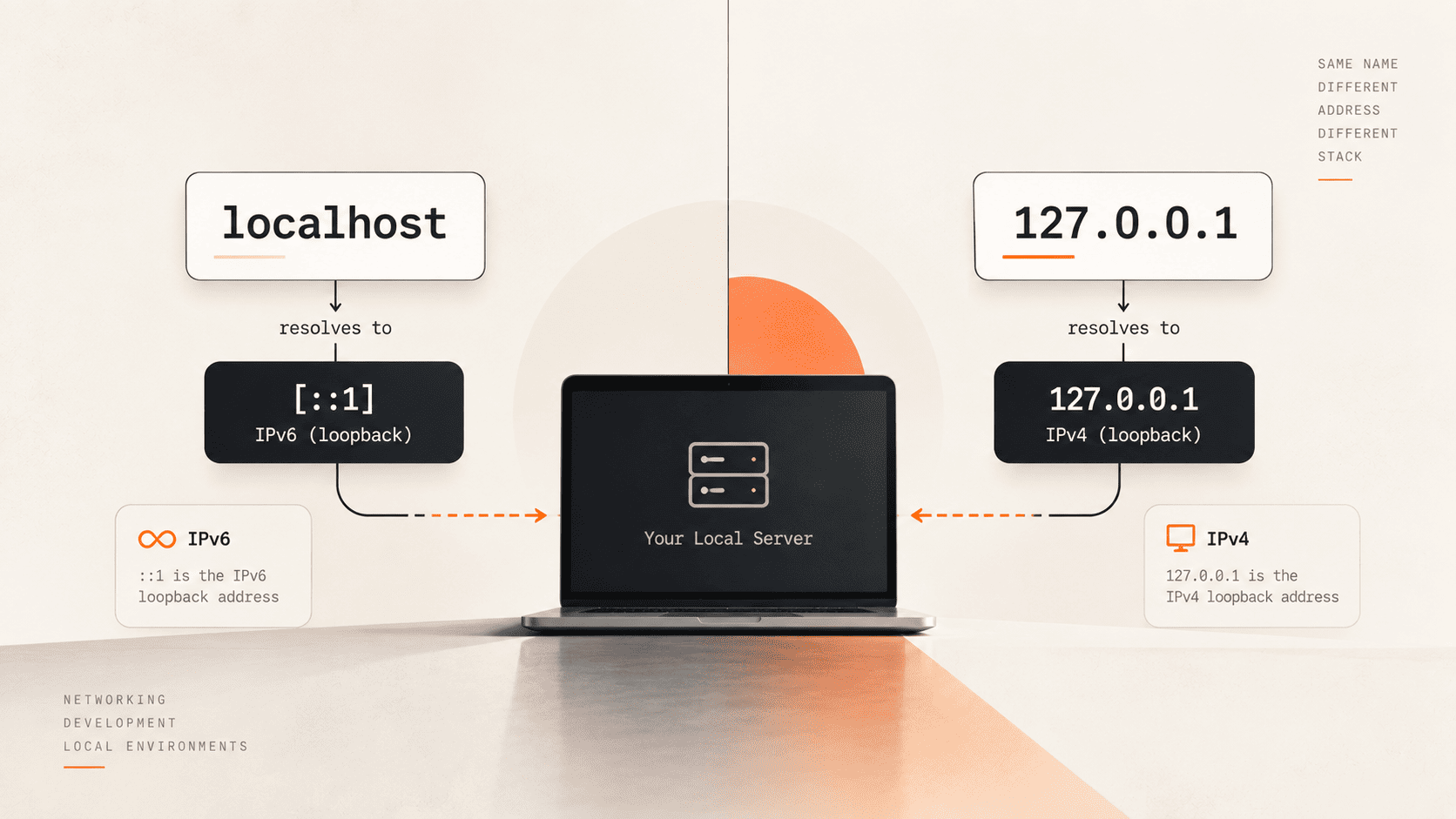
127.0.0.1 is an IP address
127.0.0.1 is an IPv4 address.
More specifically, it's a loopback address.
Loopback addresses are used when a machine needs to communicate with itself.
So when you connect to:
127.0.0.1:3000you're saying:
Connect to port 3000 on this machine's loopback interface.
The traffic doesn't need to go out to your router or across the network.
It stays on the machine.
That's why developers use it so often for local development:
127.0.0.1:3000
127.0.0.1:8080
127.0.0.1:5000
But localhost works differently.
localhost is a hostname
Unlike 127.0.0.1, localhost isn't an IP address.
It's a hostname.
Your operating system needs to resolve that name to an IP address before it can make a connection.
For example:
localhost
   ↓
IP address
   ↓
connect
On many systems, localhost is configured to point to 127.0.0.1
Which is why the two appear interchangeable most of the time.
But localhost isn't permanently tied to 127.0.0.1.
It can also resolve to the IPv6 loopback address ::1
So you can have:
localhost
   │
   ├── 127.0.0.1   IPv4
   │
   └── ::1         IPv6
This is the first reason localhost and 127.0.0.1 can behave differently.
Where ::1 comes into the picture
If you've never seen ::1 before, It's simply the IPv6 equivalent of the IPv4 loopback address.
You can think of the pair like this:
IPv4 → 127.0.0.1
IPv6 → ::1
Both mean:
this machine
but they belong to different versions of the Internet Protocol.
So when your browser connects to localhost:3000
the connection might ultimately use 127.0.0.1:3000 or [::1]:3000 depending on how your system resolves the hostname and how the application is listening.
And that's where things can go wrong.
Your server decides where it listens
Suppose your development server is listening only on:
127.0.0.1:3000Now your browser tries:
localhost:3000If localhost resolves to 127.0.0.1, everything is fine.
But if the connection uses IPv6 and ends up at:
[::1]:3000your server may not be listening there.
You now have:
localhost:3000
      ↓
    ::1:3000
      ↓
server isn't listening here
      ↓
connection fails
while:
127.0.0.1:3000
      ↓
127.0.0.1:3000
      ↓
server is listening here
      ↓
    works
The application didn't disappear.
The port didn't change.
You're still connecting to your own machine.
You simply connected using a different address.
This is why checking the port isn't always enough
When something running locally refuses to connect, the usual debugging process is:
Is the server running?
Then:
Is the port correct?
Those are good questions.
But there's another one that's easy to miss:
What address is the server listening on?
For example, these aren't necessarily equivalent 127.0.0.1:3000 and [::1]:3000
The first is IPv4.
The second is IPv6.
Your application can be listening on one and not the other.
That's enough to make localhost and 127.0.0.1 behave differently.
And Docker makes the original question even more important
Go back to our container.
Suppose your application is running inside Docker and listening on localhost:3000
Inside the container, that means:
container → localhost:3000It does not automatically mean:
container → host machine:3000And from your laptop, this:
localhost:3000means something different again.
It refers to your laptop's network environment.
Docker then provides mechanisms such as port publishing/forwarding to connect the host and container:
Browser
   │
   │ localhost:3000
   ▼
Host machine
   │
   │ published port
   ▼
Container
   │
   │ application
   ▼
server
This is why an application can be perfectly healthy inside a container but still be unreachable from your browser if the container's port isn't exposed correctly.
And if you exec into the container and run:
curl localhost:3000
you are testing something different from running the same command on your host.
Same command.
Same word.
Different localhost.
The useful distinction
At this point, there are three things worth keeping separate:
localhost
    ↓
hostname


127.0.0.1
    ↓
IPv4 loopback address


::1
    ↓
IPv6 loopback address
And there's another distinction when containers are involved:
Host's localhost
        ≠
Container's localhost
They can refer to completely different network environments.
So when debugging a local connection, don't just ask:
“Is it running on localhost?”
Ask:
“Whose localhost?”
Then ask:
“What IP address does that name resolve to?”
And finally:
“What address is the server actually listening on?”
Those questions usually get you much closer to the actual problem than simply restarting the application and trying the URL again.
So, are localhost and 127.0.0.1 the same?
Not technically.
localhost is a hostname.
127.0.0.1 is an IPv4 address.
They commonly lead to the same machine, which is why developers often treat them as interchangeable.
But the distinction matters when:
- your application listens only on IPv4 or IPv6
- you're working with Docker
- you're using WSL
- you're dealing with proxies or VPNs
- a development server binds to a specific interface
- the client and server are running in different network environments
The next time you see:
localhost:3000      ❌
127.0.0.1:3000      ✅
don't immediately assume the application is broken.
First find out where those two connections are actually going.
That small difference in understanding can save a lot of time when debugging local networking.

Team TechCoder
TechCoder Editorial Team
Independent technology coverage from the TechCoder team, exploring software development, AI, developer tools, gadgets, and the technologies shaping the future.
Get the useful stuff.
Practical engineering, AI and technology insights — without the noise.
Occasional. Useful. Unsubscribe anytime.

Comments
Loading comments…